Data Engineering Ontologies
Part 2 of from Data Engineering to Knowledge Engineering

This is a follow up on From Data Engineering to Knowledge Engineering in the blink of an eye, bringing the ontology into play! You better get used to the word ontology already, because (rumour has it); 2026 is going to be the year of the ontology. ✨
Definition: Ontology
An ontology is the explicit specification of a conceptualisation. It is the study of existence, categories and relations between what is. In computer science, an ontology consists of formal names and definitions of entities, properties and relations.
[from SHACL for the Practitioner, p. 7]
In other words, it’s a unifying machine-readable language for data, regardless of natural language. And it holds semantics!
Recap of the story
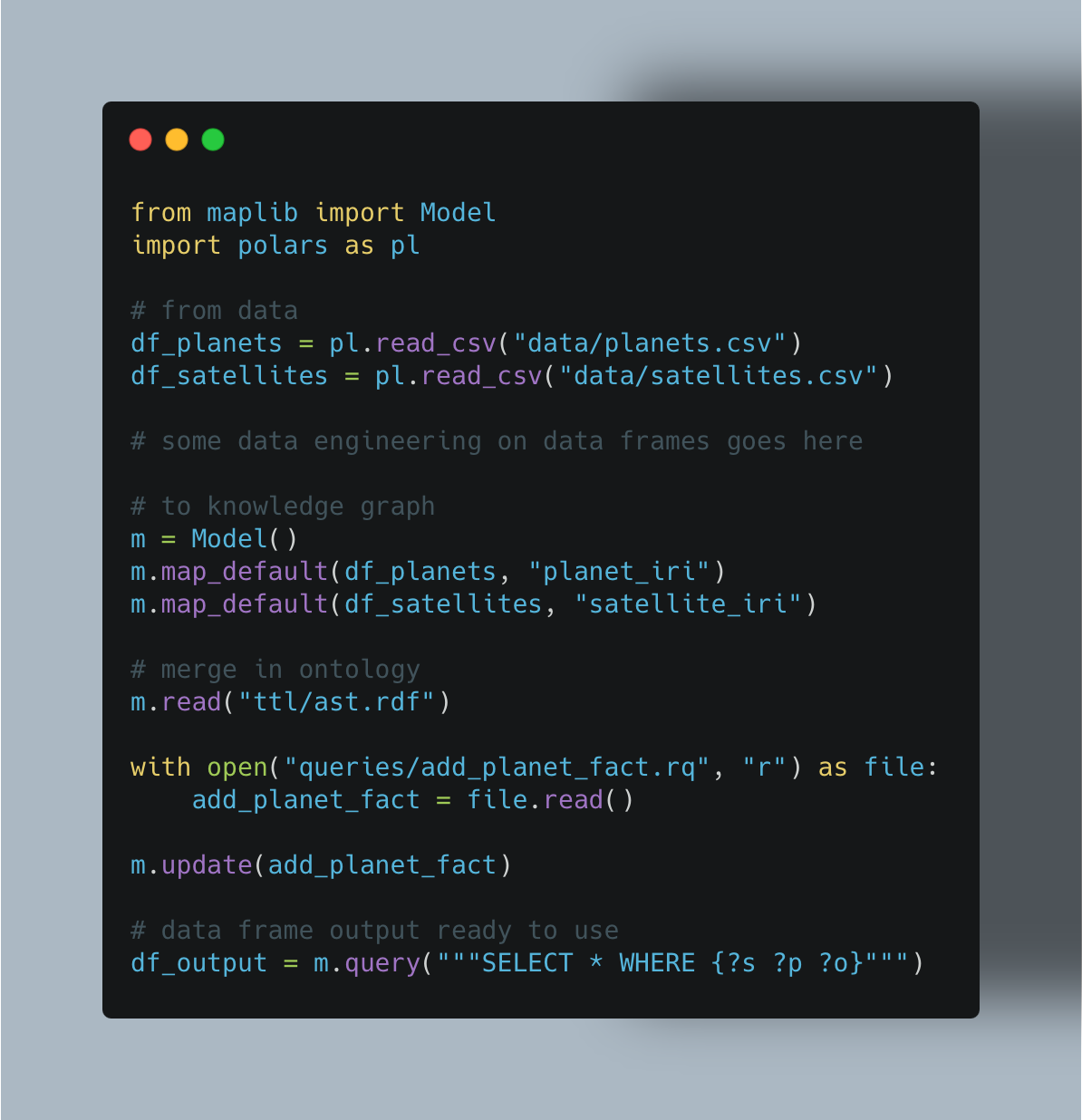
My previous post showed how we can go from a CSV file to an operational knowledge graph using Polars data frames with 4 lines of Python code with maplib.
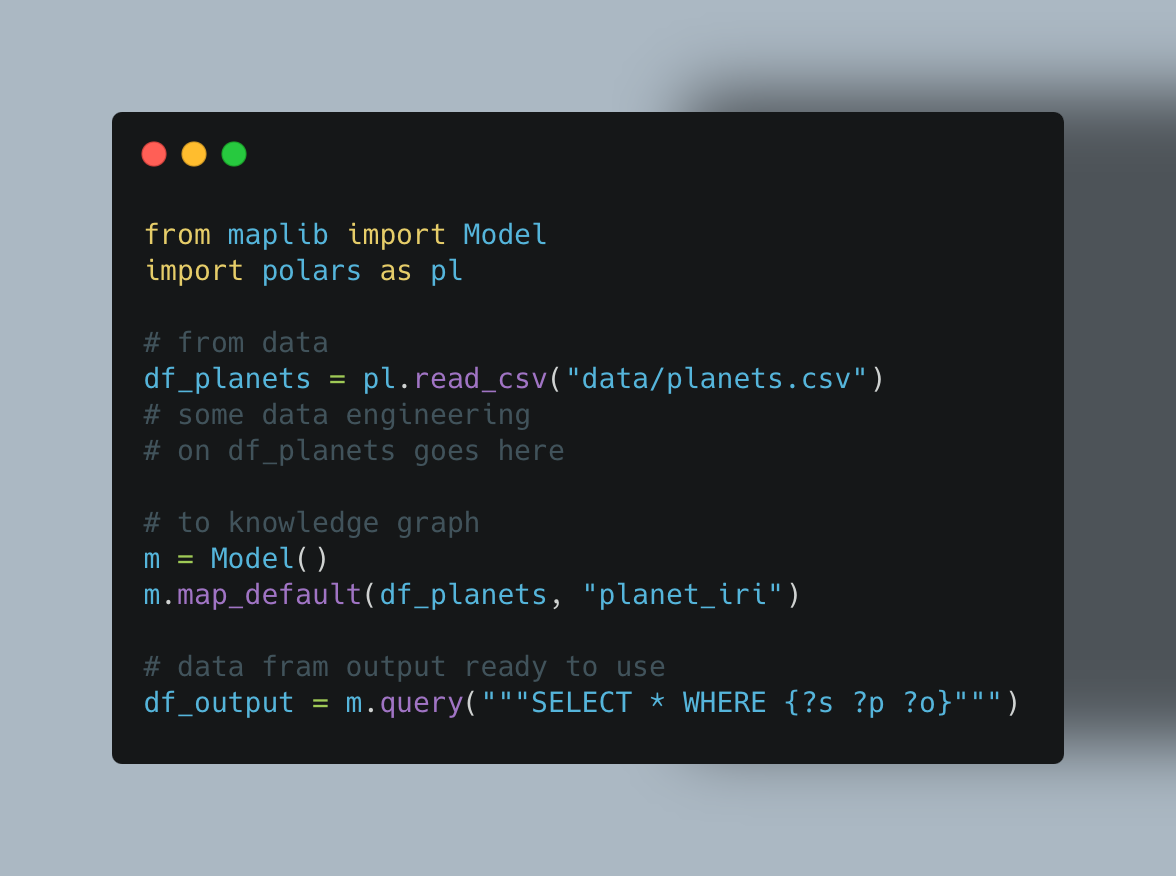
What is happening here?
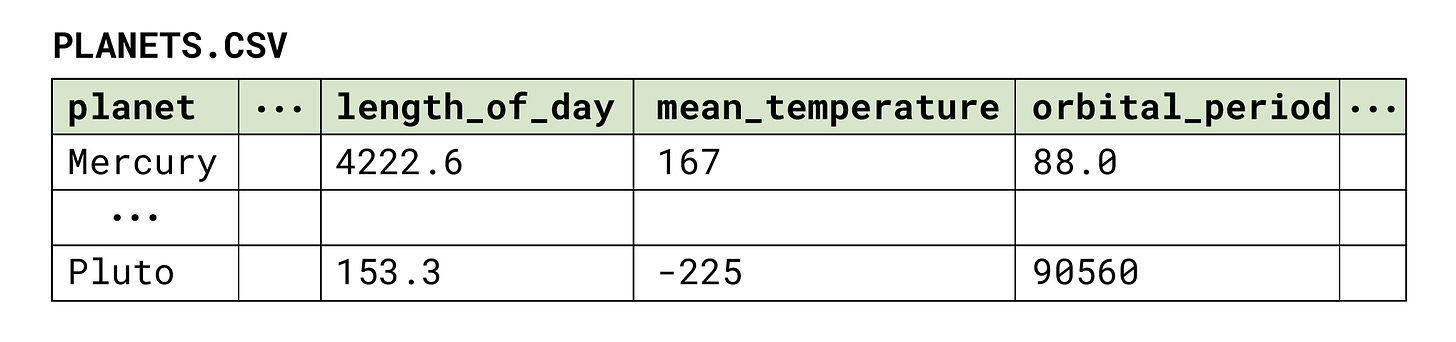
First of all, we have our file data/planets.csv, that contain some data points for the planets in our Solar System (including Pluto):
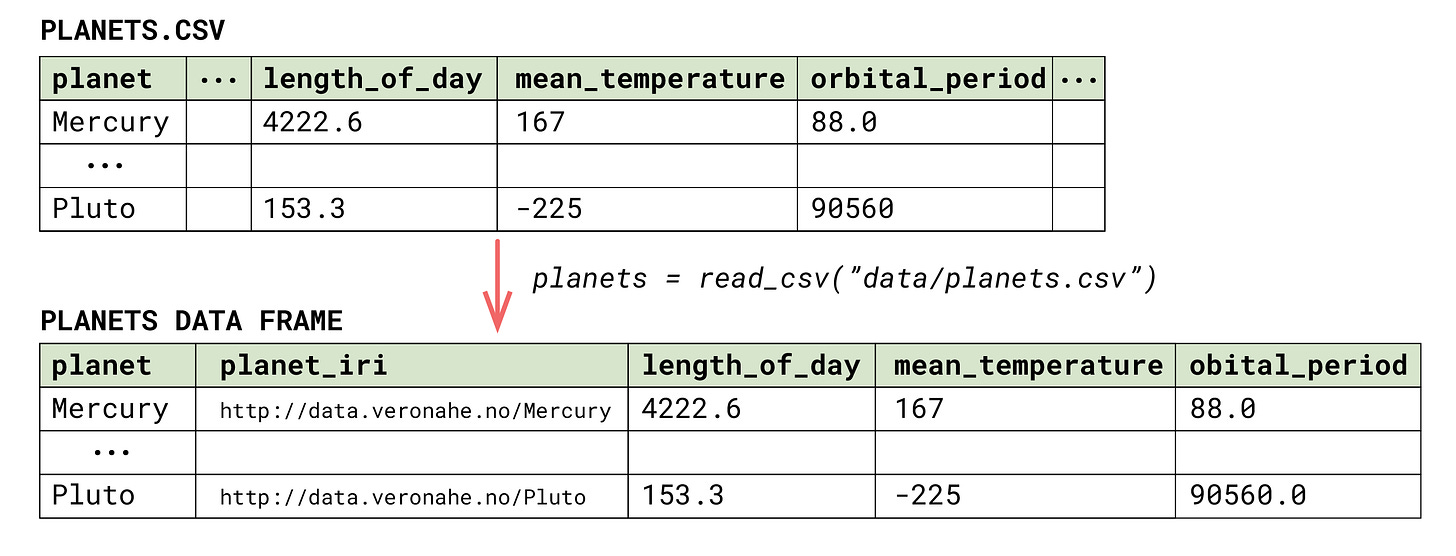
We do some simple data engineering with reading this into a Polars data frame, adding another column for our subject IRIs (the one named planet_iri), and select only the columns we want to work with.
Then we initialise an empty maplib Model, which is our knowledge graph, and serialise the data frame using maplib’s built-in default mapping.
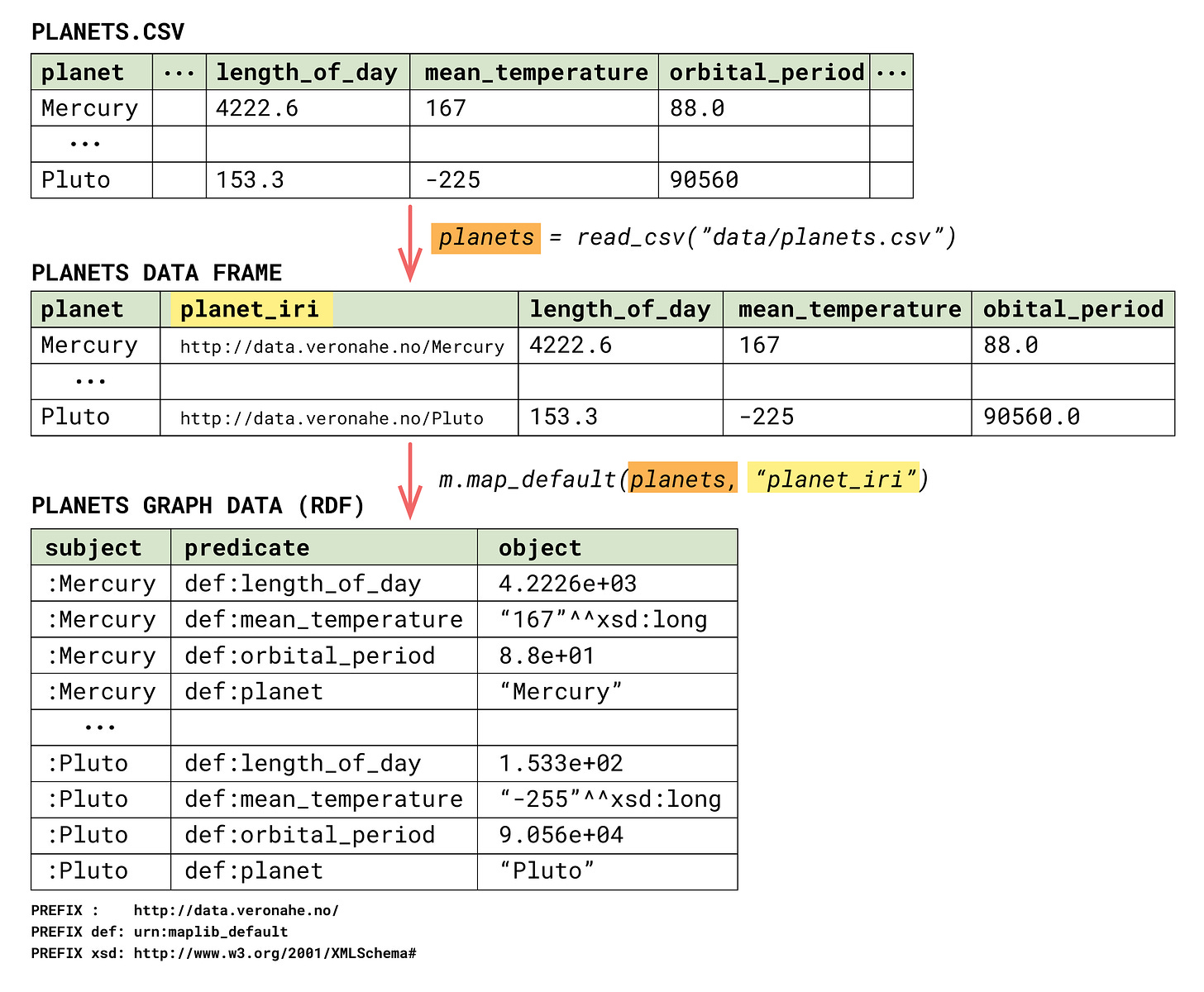
We can then extract the knowledge graph as a data frame, using SPARQL, selecting all (*) subjects predicates and objects from the graph (?s ?p ?o).
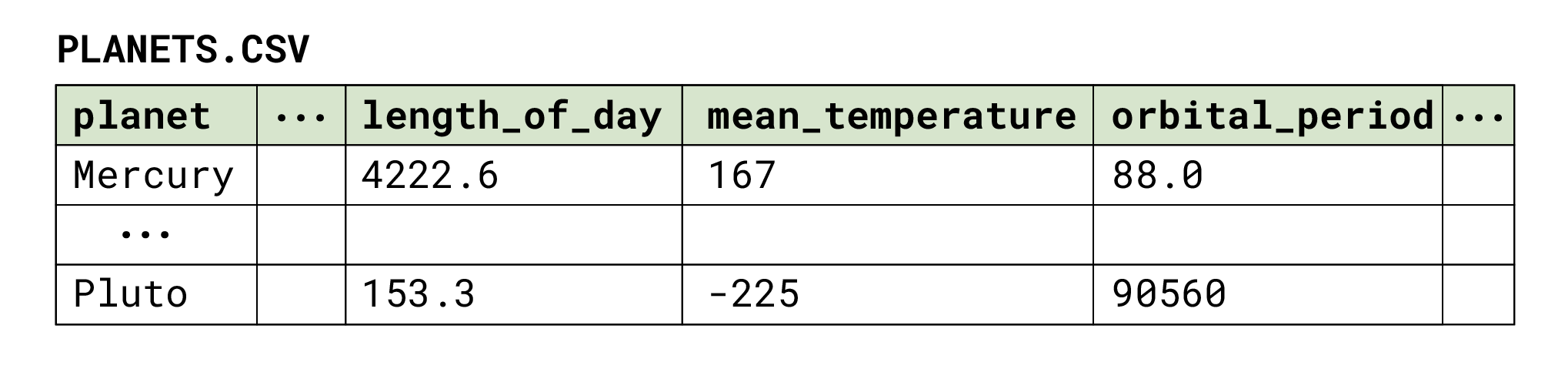
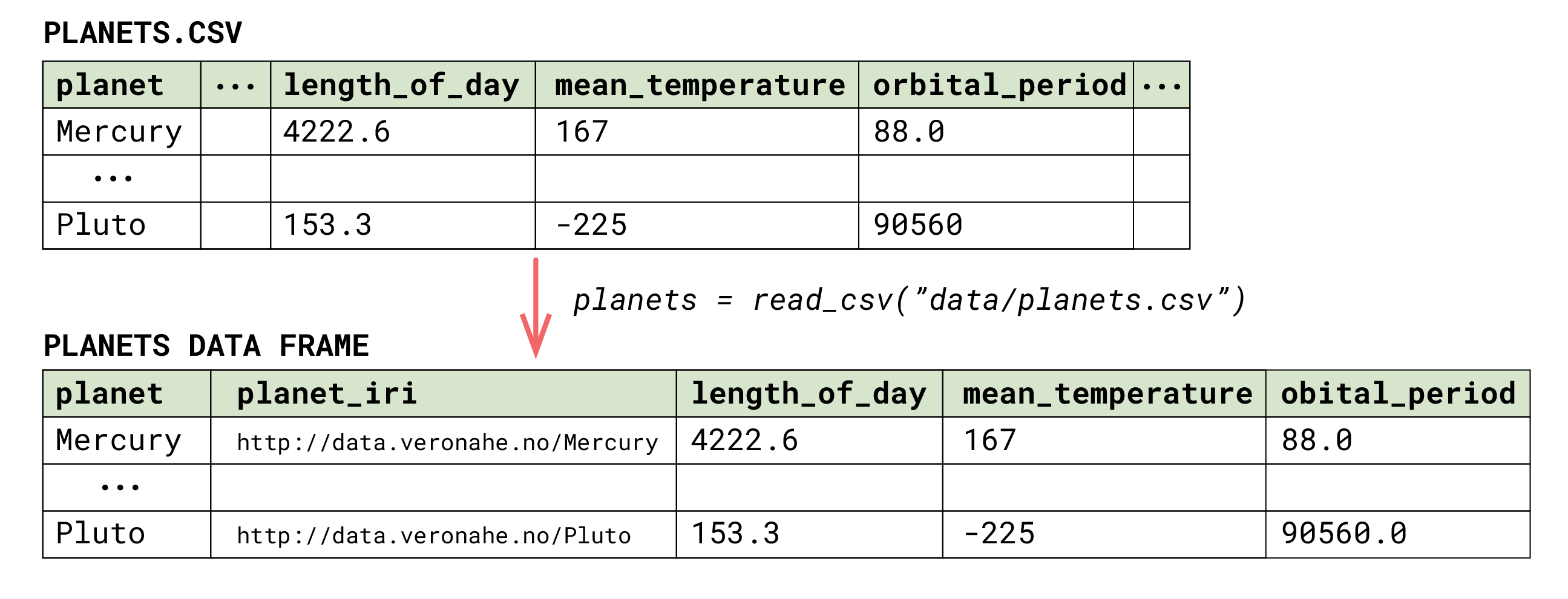
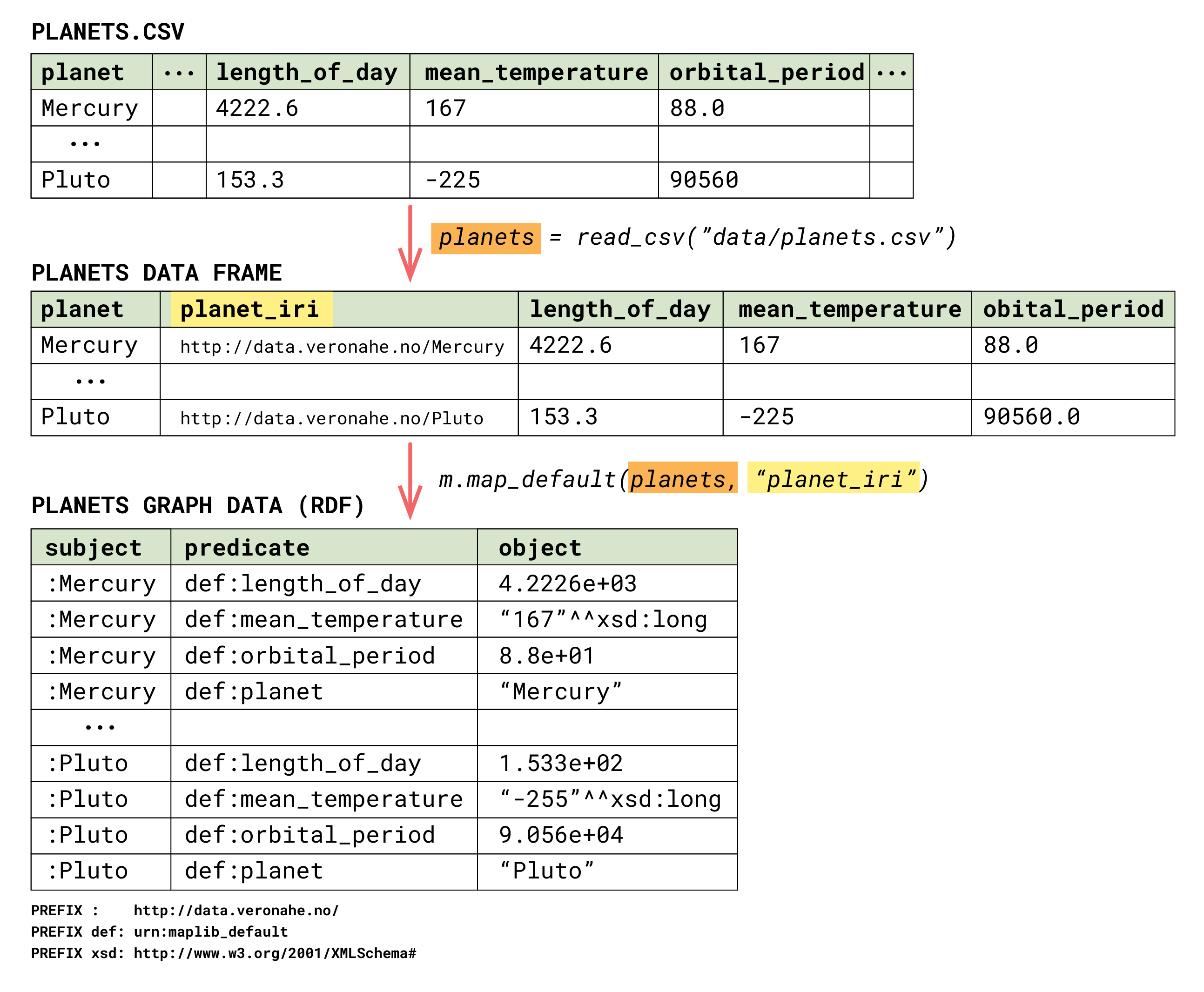
The resulting knowledge graph from this example does not really contain the knowledge layer of a knowledge graph. Which is the ontology. Let us, with a few simple steps, add one!
Benefiting from existing knowledge
In a world with huge amount of content,
knowledge becomes valuable.— Denny Vrandečić, Knowledge Graph Conference 2023
Luckily, as a data engineer, you can benefit from already existing knowledge. There are plenty of published (some even standardised) ontologies available for you to re-use. Reusability are one of the key assets of a knowledge graph. We don’t have to re-invent the wheel, when somebody better on wheel-making than us has already built them!
Examples on well-known and well maintained ontologies for you to re-use
Simple Knowledge Organisation System (SKOS): for terms and definitions for your concepts
Data Catalog Vocabulary (DCAT): for describing datasets and data cataloges
The Financial Industry Business Ontology (FIBO): for all things finance
SNOMED-CT: for health related terms and the like
Core Public Service Vocabulary (CPSV): for describing events, public services and outcomes
PROV: for representing provenance information
CIDOC-CRM: for all things cultural heritage
gist: upper ontology for domain-independent concepts
...and I could written many, many more. Google around for your interest with a suffix of “ontology”, and you’ll probably find what you’re looking for!
Thinking like an knowledge engineer
Back to our example: The resulting knowledge graph of planets, without the knowledge layer. Let’s create the layer in a few simple steps!
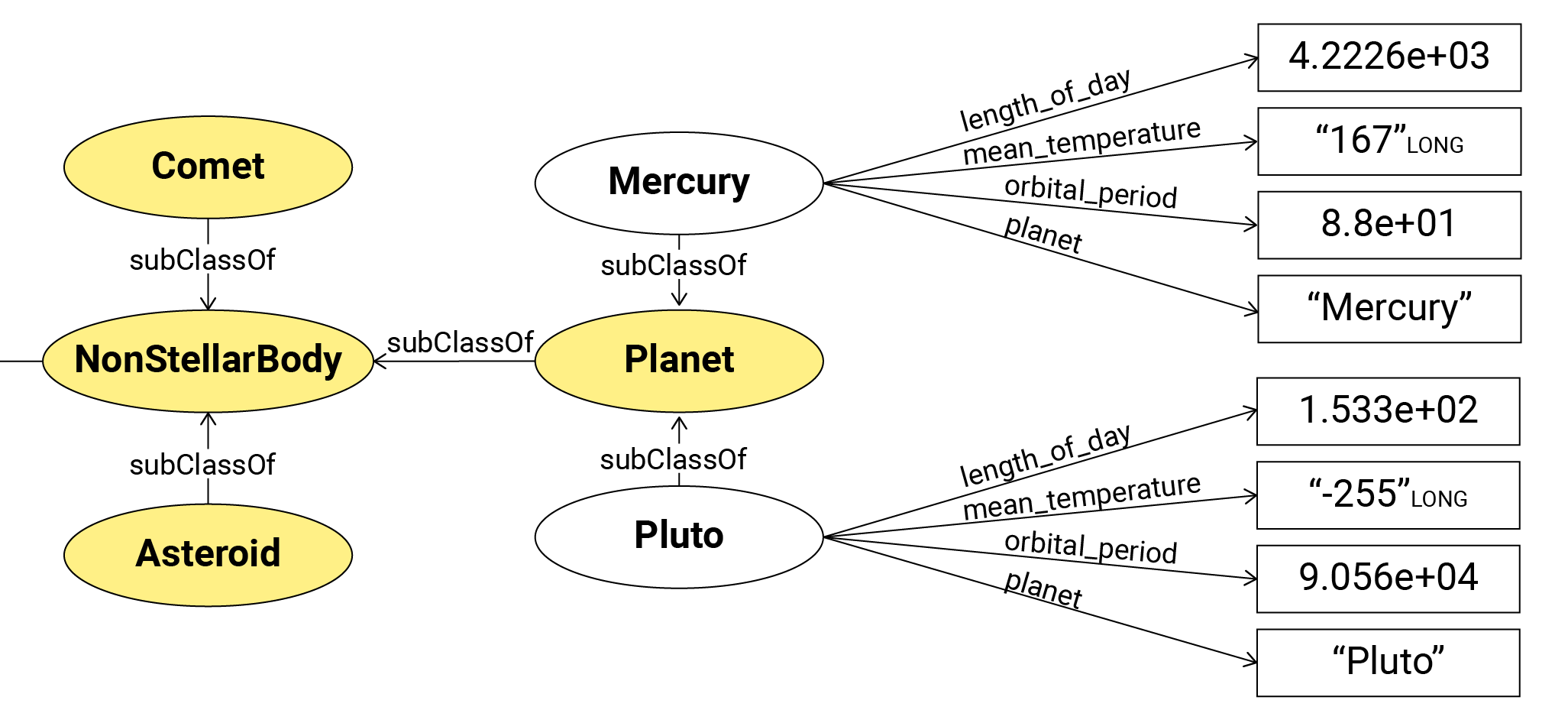
The Planet graph data (RDF) (the table earlier in the article) are typically visualised as something like this.
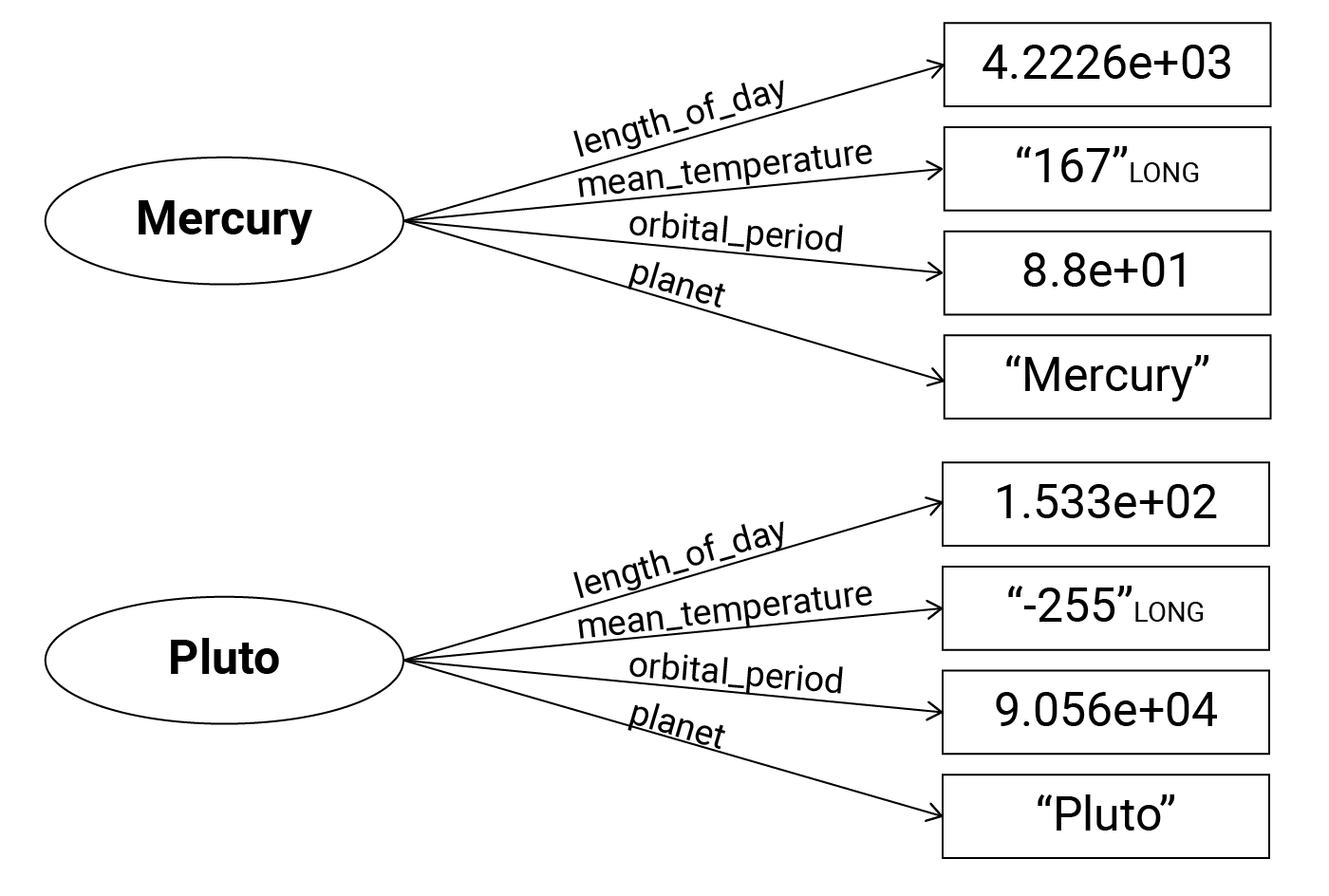
A knowledge engineer would ask; “What is in common between these two subjects?” The subjects in this illustration is Mercury and Pluto, but for the whole dataset it’s all the planets of Sol.
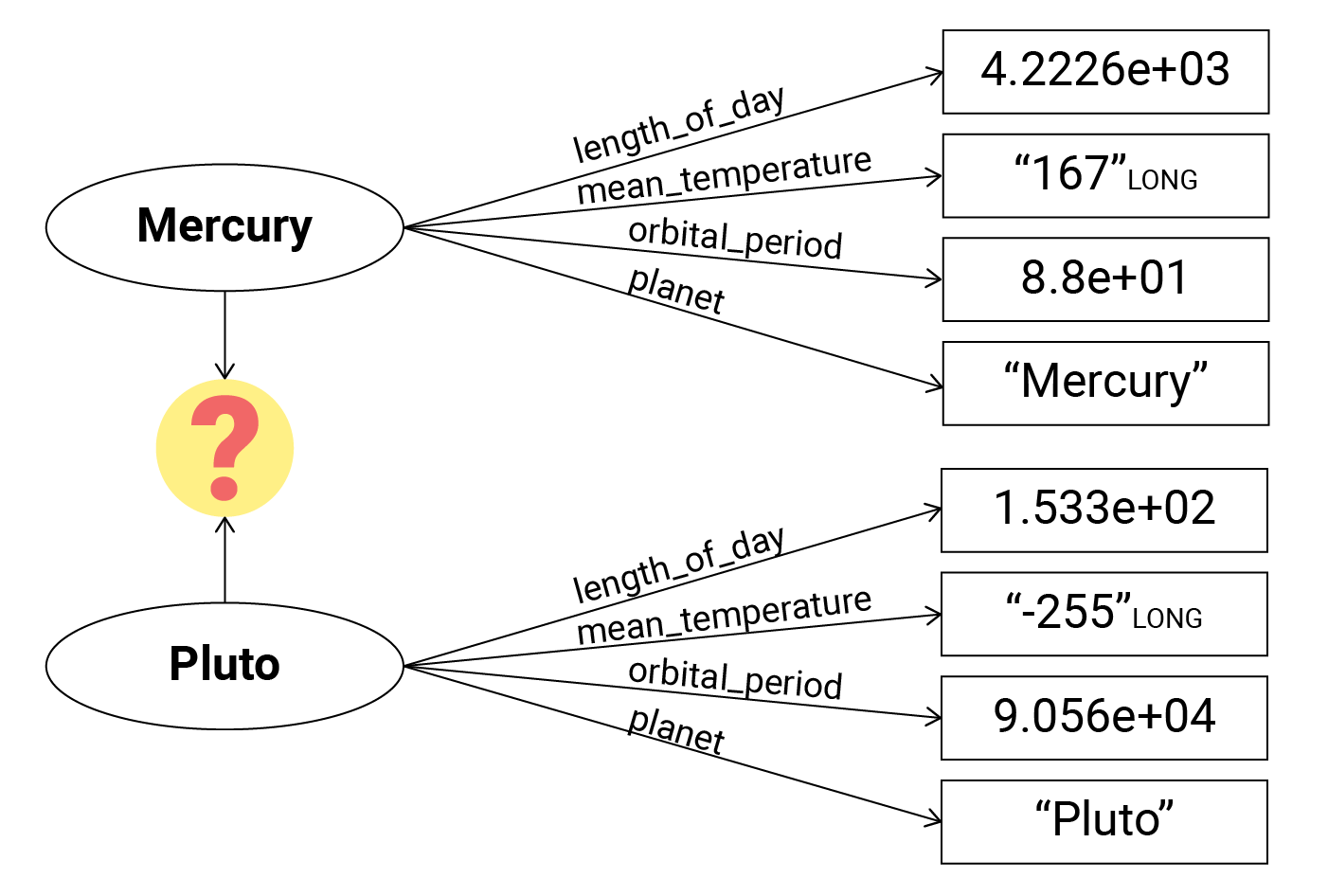
Well, the most obvious thing they have in common is that they are Planets, right? And now we are stepping into the ontology landscape; What is a planet?What does it mean to be a planet?How does being a planet differ from other things?
The ontology will define the abstract concept of planet, and similar things, providing meaning and semantics to our data. This is the way we know that Mercury, in this context, is the planet and not the chemical element. And likewise, that Pluto is the planet, and not the Disney character. The Disney character Pluto would have a completely different IRI than the planet of Pluto, as all things have their own global, unique identifier (we define things only once). And the Disney character and the planet are two different things.
Enough of this! I promised you to connect knowledge without being an ontologist.
I am using ASTROBJECT for my planets (that’s a random choice for this example), but you can also browse https://ontoportal-astro.eu for even more snacks on astronomical things.
Connecting data!
Now, there are several ways of connecting ontologies to your data. 1) Federation 2) Local mapping 3) Triple store connectors, and probably even more. I’m sure that you as a data engineer know all the tricks in the book of fetching data.
For the sake of example, I will use local file reading, but the foundational mechanism is pretty much the same in any case. To merge in the ontology with my planet data stored in my knowledge graph, I simply read in the whole thing into my Model m.
m.read("rdf/ast.rdf", format="rdf/xml")That adds more than 5500 triples for you to play with. Mostly regarding classification of astronomical concepts and their terms.
The Quest for the IRI
To find the correct IRI for this ontology’s representation for Planet, I’ll head over to their documentation and search for “Planet”, and there we go; the magical IRI! I will copy paste this one, since I will write a SPARQL-query to enrich my knowledge graph, finally connecting some knowledge layer onto my Planet data.
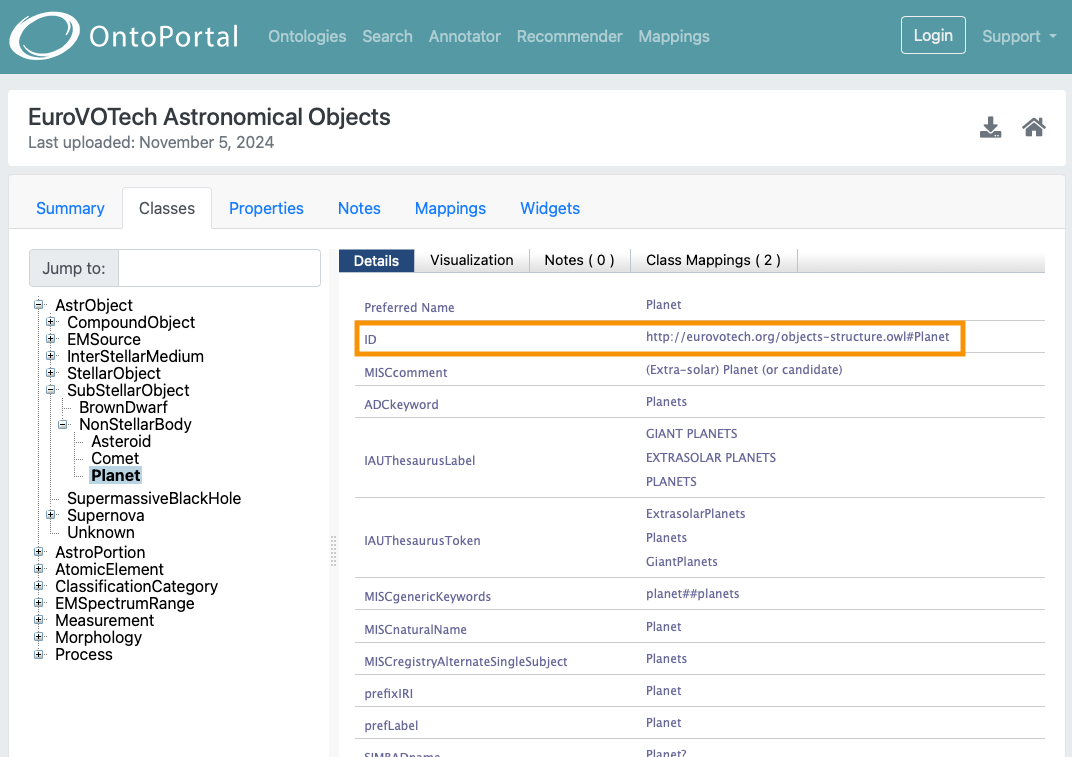
The query I’ll be using to enrich my existing planet data:
PREFIX def: <urn:maplib_default:>
PREFIX rdf: <http://www.w3.org/1999/02/22-rdf-syntax-ns#>
PREFIX ast: <http://eurovotech.org/objects-structure.owl#>

INSERT {
  ?s rdf:type ast:Planet .
}
WHERE {
  ?s def:planet ?o .
}
Please note the keyword PREFIX. Here we are creating short names for the namespace in an URI instead of writing the w h o l e thing each time. Splendid!
Back into my python code, I will read and run this query using maplib.
with open("queries/add_planet_fact.rq", "r") as file:
  add_planet_fact = file.read()

m.update(add_planet_fact)
Let’s now do a quick extraction to check if the knowledge graph indeed got enriched with the new fact.
planet_df = m.query("""
  PREFIX ast: <http://eurovotech.org/objects-structure.owl#>
  SELECT ?planet
  WHERE { ?planet a ast:Planet }
""")
This will return a data frame with the shape of (9, 1), listing all our planets using their respective IRI from our knowledge graph.
WOHO! Congratulations! You just connected your graph data with an ontology, creating a true knowledge graph! Now let’s add some more data, shall we?
Connecting even more data
I am going to use a dataset of satellites, as found at devstronomy/nasa-data-scraper on GitHub.
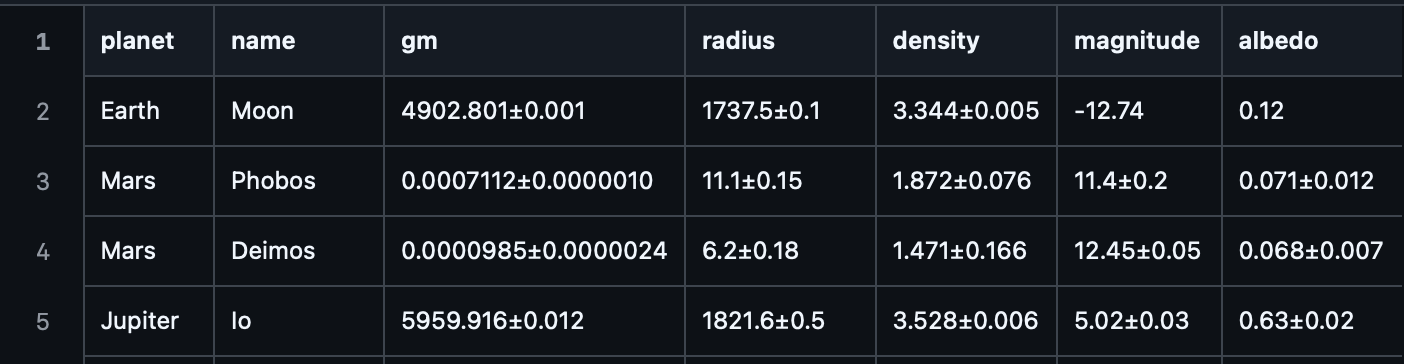
Let’s get back to some data engineering, providing with IRIs before serialising and enriching our knowledge graph with these data.
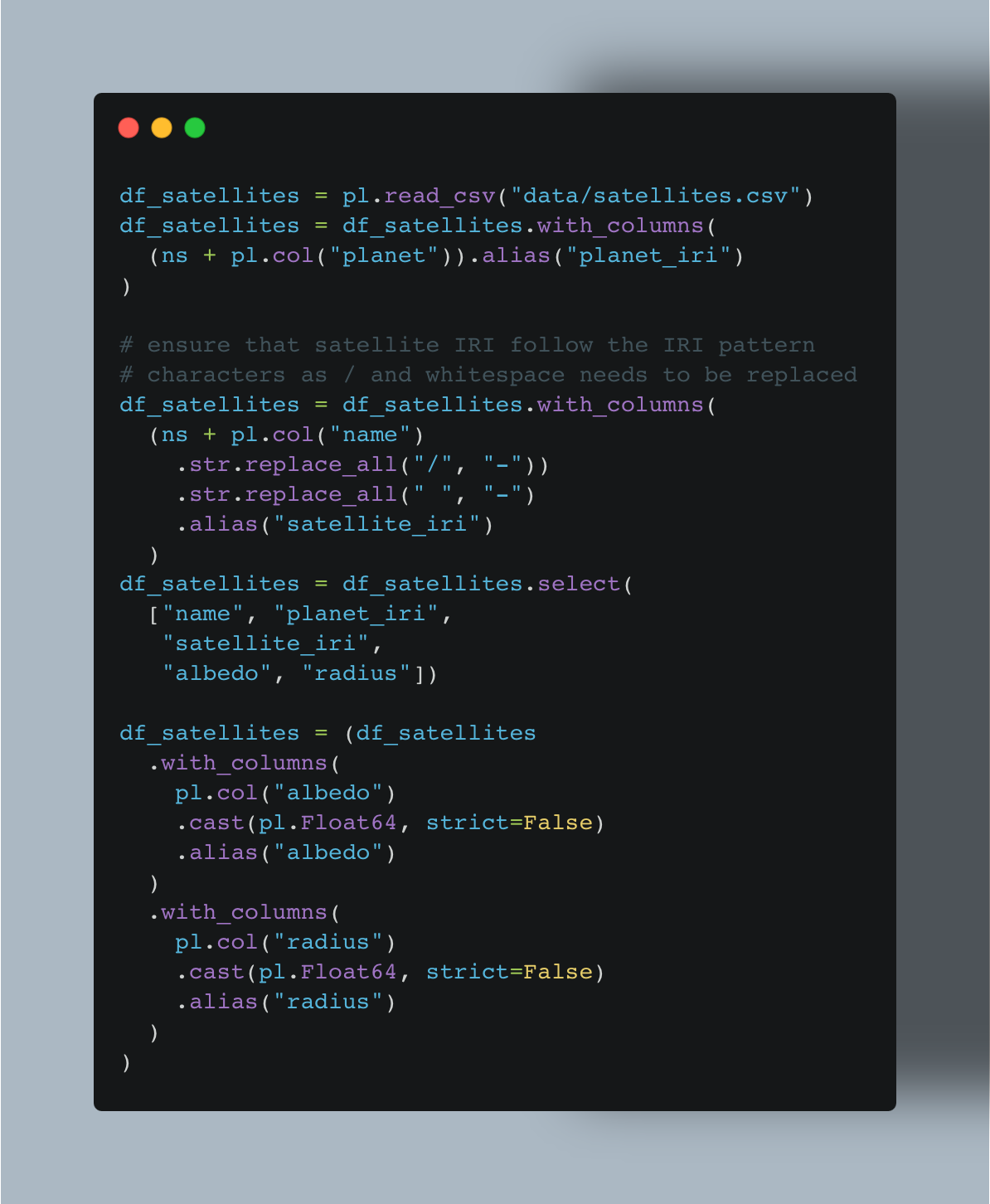
That was a bit more engineering than for the planet data! The two most important columns are satelitte_iri, for creating a unique IRI for all our satelittes. And of course planet_iri, that will correspond with the IRI for our planets. This particular column, as soon as it’s serialised into our knowledge graph, will merge these two datasets seamlessly in the knowledge graph itself. As the planet_iri coming in with the satellite data are identical to the planet IRIs already present in the knowledge graph. That is one of the magical traits of a knowledge graph, there are no S(PAR)QL JOINS!
When our data frame is ready, we can do a default mapping on our Model m.
m.map_default(df_satellites, "satellite_iri")Let’s now ask a simple query that ask across planets and satellites! Just a simple one.
PREFIX def: <urn:maplib_default:>

SELECT ?planet (COUNT(?moon) AS ?moonCount)
WHERE {
  ?moon def:planet_uri ?p .
  ?p def:planet ?planet .
}
GROUP BY ?planet
This query selects ?planet and are counting the occurances of ?moon, naming the count ?moonCount. In the query body we ask for all things that have a relationship def:planet_uri to something else. In our knowledge graph, that is the relationship between satellites and planets. Then we are asking for the def:planet of that something, and if you remember from the previous post, this is the textual label of the planet name. The output is then the planet name as text (instead of IRI) and a number for their moon count. Let us run this query by:
df_moon = m.query(count_moons)The data frame df_moon will contain two columns corresponding to the variable names in our SELECT from the SPARQL-query. Holding a result from a question that traverse two datasets represented as knowledge graph.
  % python main.py
  shape: (7, 2)
  ┌─────────┬───────────┐
  │ planet  ┆ moonCount │
  │ ---     ┆ ---       │
  │ str     ┆ u32       │
  ╞═════════╪═══════════╡
  │ Jupiter ┆ 67        │
  │ Neptune ┆ 14        │
  │ Pluto   ┆ 5         │
  │ Mars    ┆ 2         │
  │ Earth   ┆ 1         │
  │ Uranus  ┆ 27        │
  │ Saturn  ┆ 61        │
  └─────────┴───────────┘
Summary
This article demonstrated how to connect your already serialised data with a pre-defined ontology. It has shown you where to find pre-defined ontologies, and how to identify the IRIs you need when connecting data.
The article has also demonstrated how to add new data through data frames, merging over common IRIs and default mapping into the same maplib Model. We have queried the graph to create new data frames containing information across multiple datasets represented in the same knowledge graph.
Next step for you: Would be to explore the capabilities of knowledge graphs, through reasoning and validation. But that’s for another time, folks!
Hubs for learning
Open HPI Knowledge Graphs - Foundations and Applications: free & on-demand video lectures
Knowledge Graph Academy: run a course series with tutors, personalised training
maplib documentation & masterclass: Python tooling for data engineers and knowledge engineers
From Data Engineering to Knowledge Engineering article-series
Part 1: From Data Engineering to Knowledge Engineering in the blink of an eye
Part 2: this
Part 3: SPARQL for SQL Developers: A Translation Guide
Part 4: From SQL Constraints to SHACL Shapes: Declarative Data Validation
Your KG series is amazing! This is what A data engineer is fumbling upon. Keep it coming
Explain ontology to a 5 year old